



ZenX Coins are learning reward points recorded in the ZenX Academy LMS. Students earn them through eligible learning activities, successful sign-ins and available one-time social claims. The current screenshots show coin balances, reward rates and achievement tiers; they do not establish a live cash withdrawal service or a tradable cryptocurrency.
This guide explains what ZenX Coins do, how to create an account, where to claim rewards and what the proposed coupon and future crypto plans mean. Reward availability and eligibility should always be checked inside your student account.
Create your ZenX Academy student account → Already registered? Sign in →
What Are ZenX Coins?
ZenX Coins, also shown as “Zenx Coin” or “ZenX Coin” in the portal, are the academy’s learning reward points. They help students see recognition for participation across lessons, assignments, quizzes and community activities in one LMS balance.
A ZenX Coin balance is a platform record of eligible activity. It is not evidence of a bank balance, a fixed rupee value, a blockchain token balance or an investment return. Keep the distinction between earning learning points, unlocking achievement badges, redeeming an eligible reward and withdrawing money.
Why Does ZenX Academy Use a Learning Rewards System?
ZenX Academy uses coins to connect learning participation with visible progress. Completing a lesson, submitting a personal daily learning entry or getting a task approved can contribute to your reward balance under the published rules.
The system gives students several ways to participate instead of relying on one activity. Lesson completion supports course progress, approved tasks recognise practical work, and quizzes combine a submission reward with the weight assigned to correct answers. Coins complement learning; they do not replace the work itself or prove professional competence.
How Do You Earn ZenX Coins?
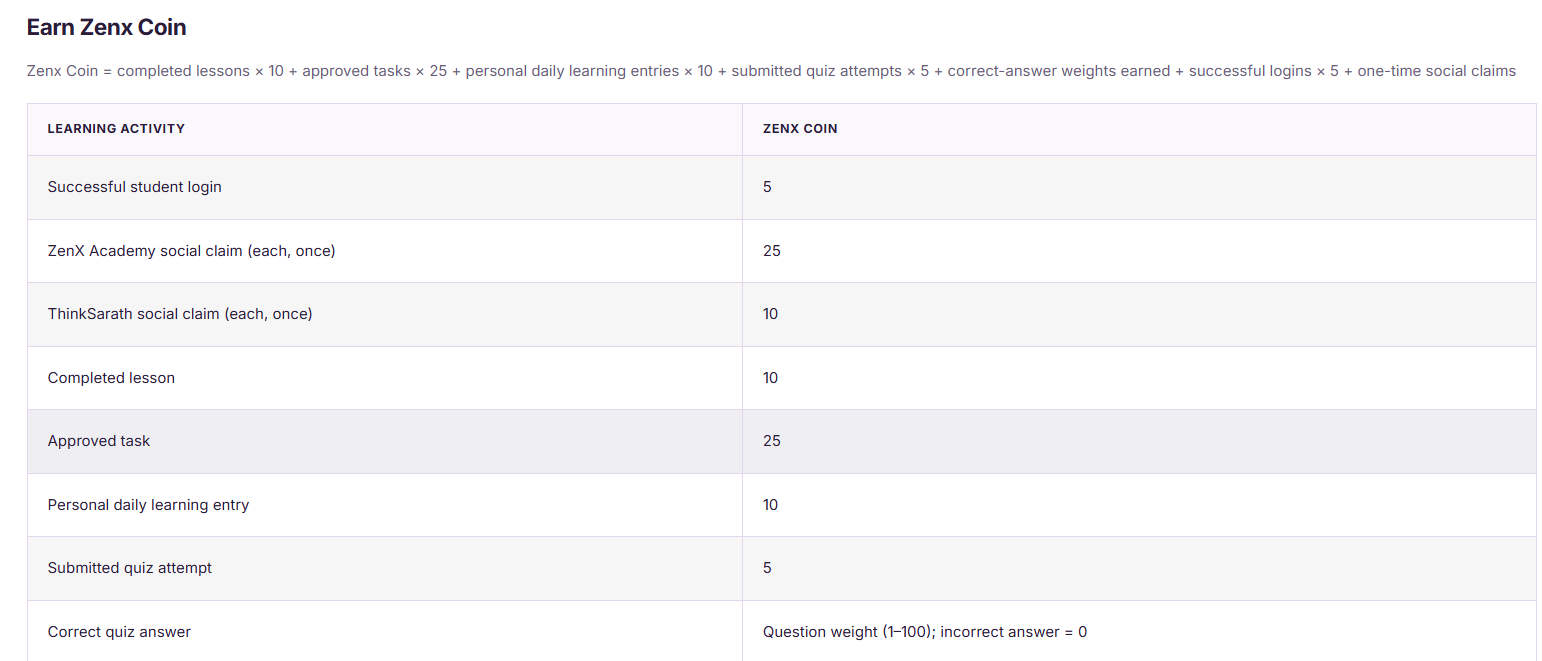
You earn coins when the LMS records an eligible activity. The reward table in the supplied screenshot lists these rates; the current live dashboard also confirms successful sign-in and one-time social claim rules.
| Eligible activity | ZenX Coins shown | Important condition |
|---|---|---|
| Successful student sign-in | 5 | Refreshing a page does not earn a sign-in reward. |
| ZenX Academy social claim | 25 for each eligible account | Once per account for each social reward. |
| ThinkSarath social claim | 10 for each eligible account | Unavailable while the card says “Link coming soon”. |
| Completed lesson | 10 | The lesson must be recorded as completed. |
| Approved task | 25 | Task approval is required; submission alone is not the stated trigger. |
| Personal daily learning entry | 10 | Follow the current daily learning sheet rules. |
| Submitted quiz attempt | 5 | Subject to the quiz’s eligibility and attempt rules. |
| Correct quiz answer | Question weight, shown as 1–100 | Incorrect answers earn 0 for this component. |
Points may change: ZenX Academy may update coin rewards, badge thresholds, eligibility and redemption rules at any time. The figures and screenshots below are examples recorded on 20 October 2026. Always check the latest LMS rules before claiming or redeeming.
Do not assume repeated submissions or repeated completion of the same activity will earn additional points. Check the portal’s eligibility rules and reward history before repeating an action.
How to Start: Register, Log In, Learn and Claim
Follow these four steps. Use the same student account each time so your learning progress and ZenX Coin balance stay together.
Step 1: Create your student account
Open the registration page. Fill in the required details shown on the form, create your password and submit. Complete verification if the portal requests it. If your account already exists, go straight to Step 2.
Step 2: Log in and open your dashboard
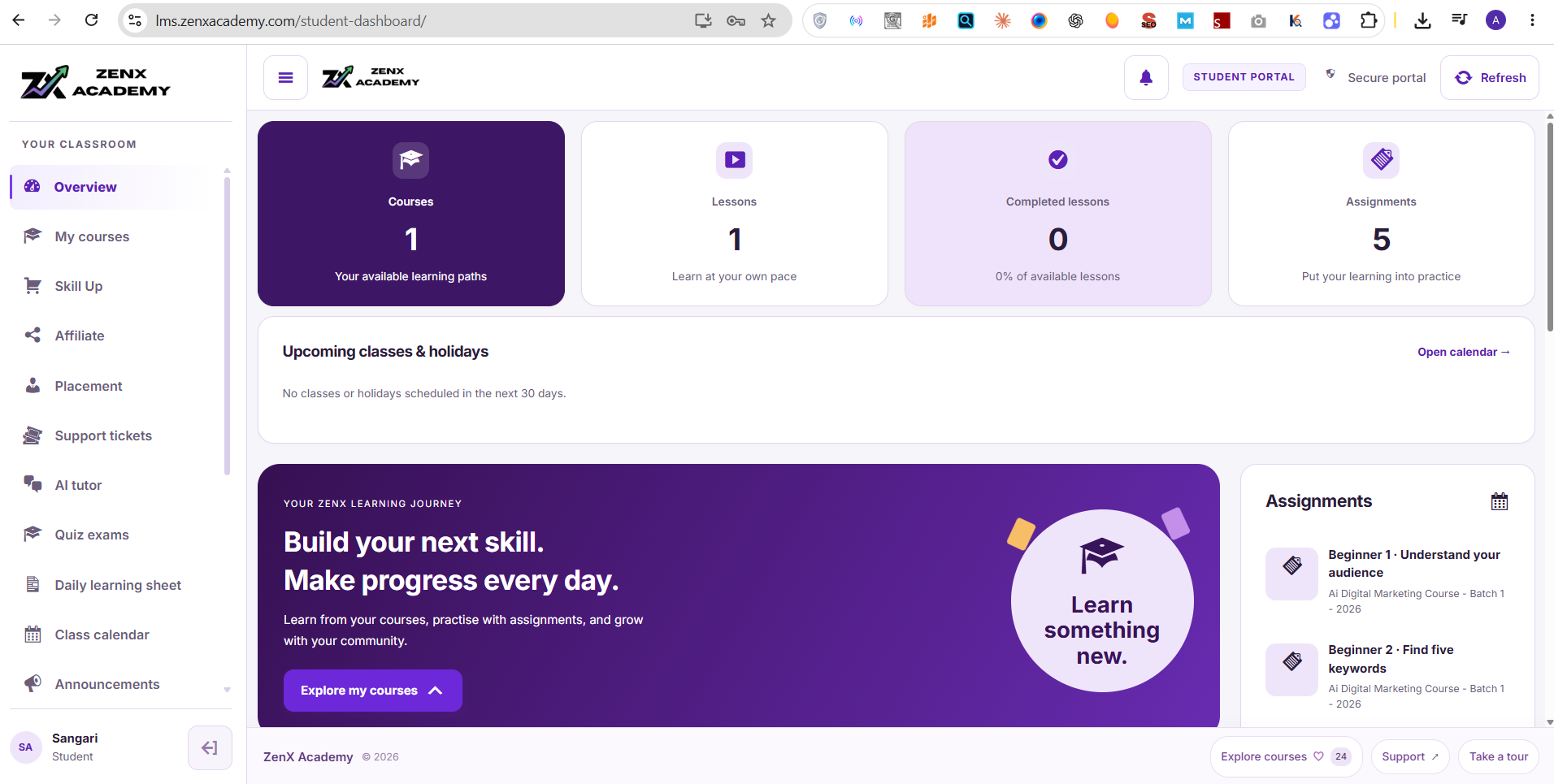
Use the student login page. After signing in, open Overview. This dashboard shows your available courses, lessons, assignments and learning progress. An existing signed-in session may open the dashboard directly.
Step 3: Choose an available learning activity
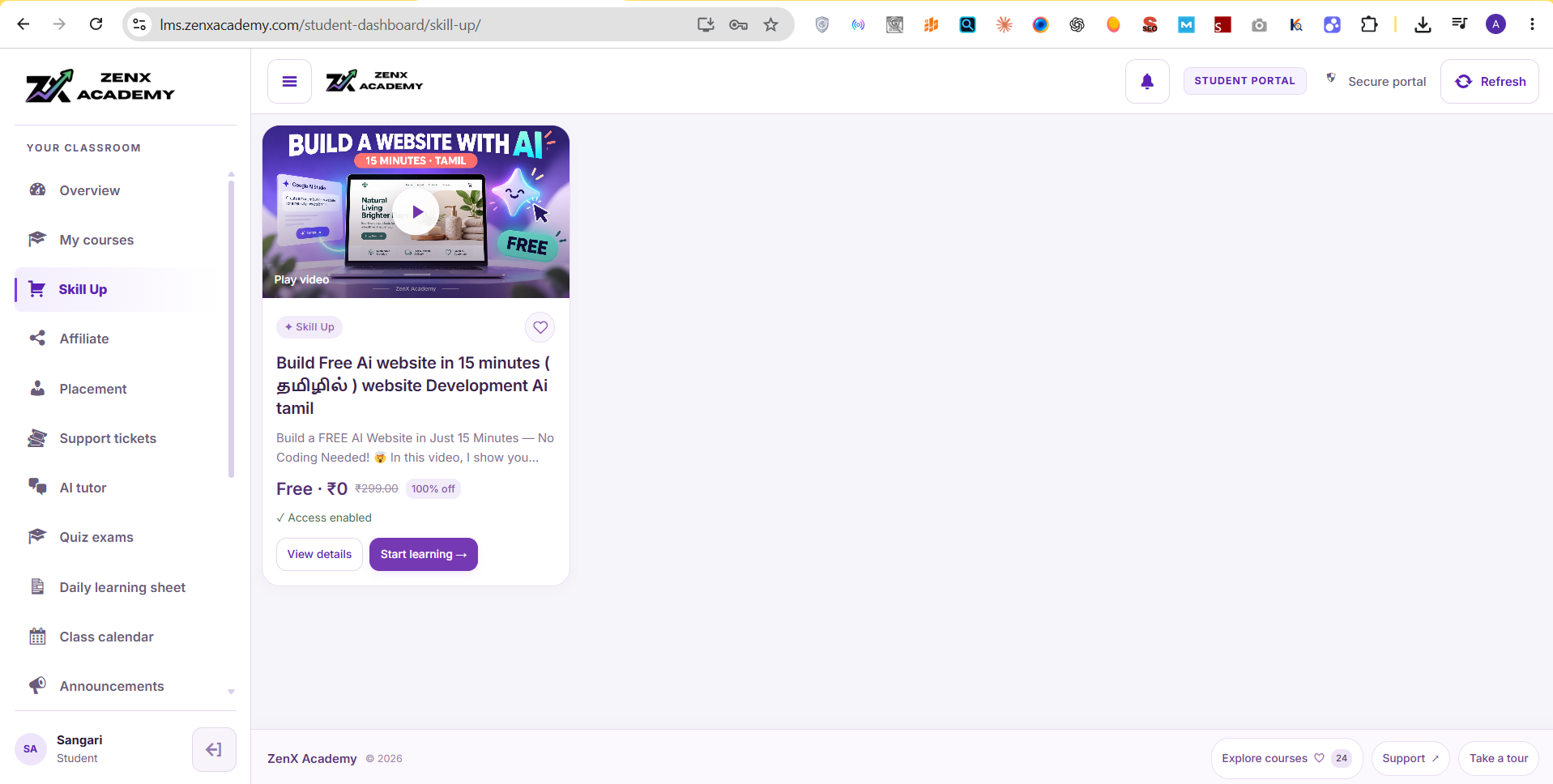
Open My courses for your enrolled lessons, or Skill Up to explore available learning content. Select “View details” to check access, then “Start learning” when available. Course access depends on your account; registration does not unlock every paid course.
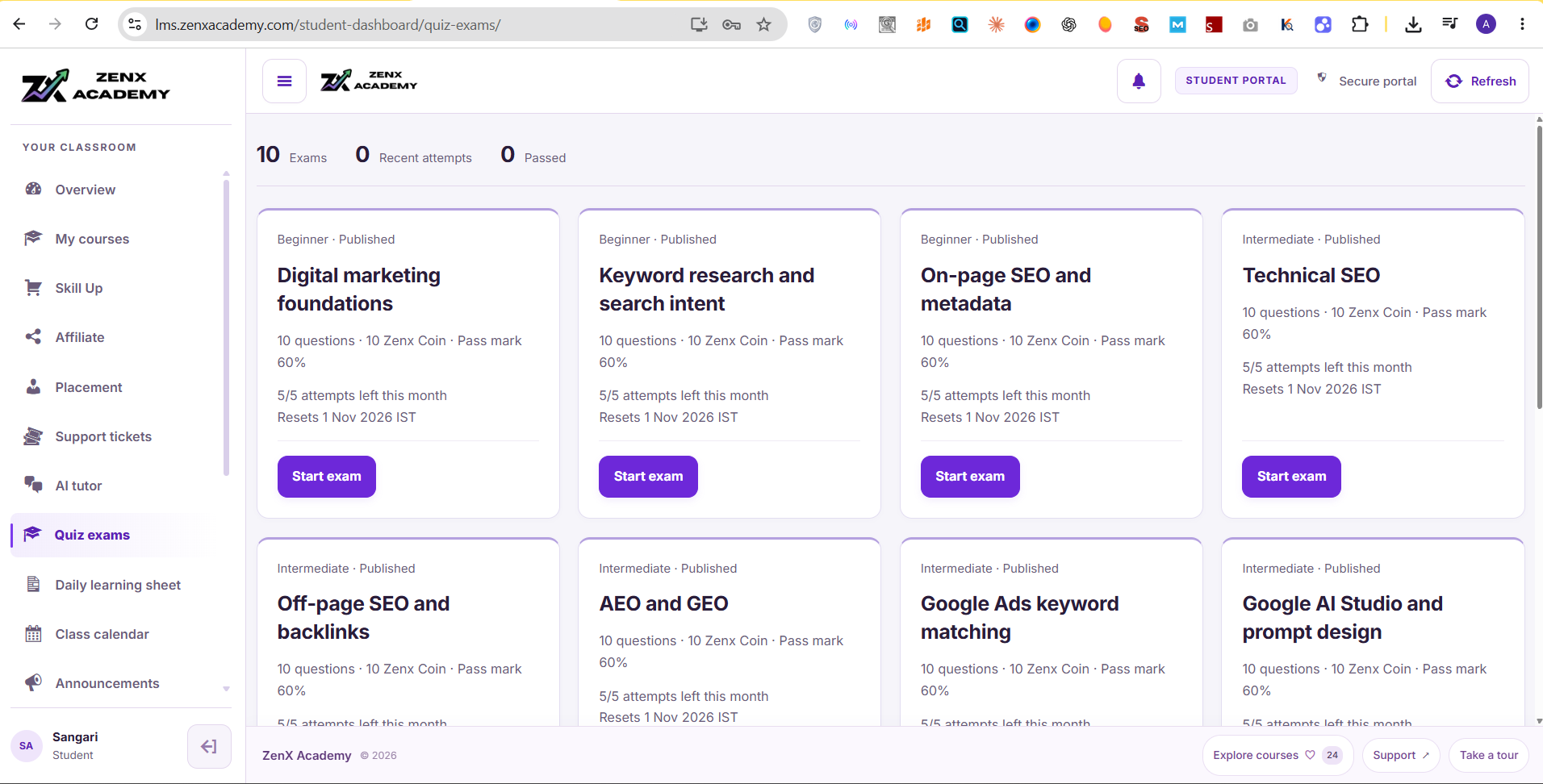
For quizzes, open Quiz exams, read the attempt limit and pass mark, then choose “Start exam”. Complete the activity according to its rules. Quiz cards can show different reward information, so check the specific exam rather than assuming the general table applies unchanged.
Step 4: Claim eligible rewards and check your balance
Return to Overview and find “Free claim · ZenX Coin”. Open an available social card using “Visit account”, follow its instructions, return and select “Claim” if available. Check for “Claimed ✓” and review your balance.
Social rewards are self-declared, once per account. Opening a link does not verify a follow or subscription. “Link coming soon” means that reward is not available yet. Lesson, task and quiz rewards depend on the activity being recorded and any required approval.
Need help? Open your instructor or support page
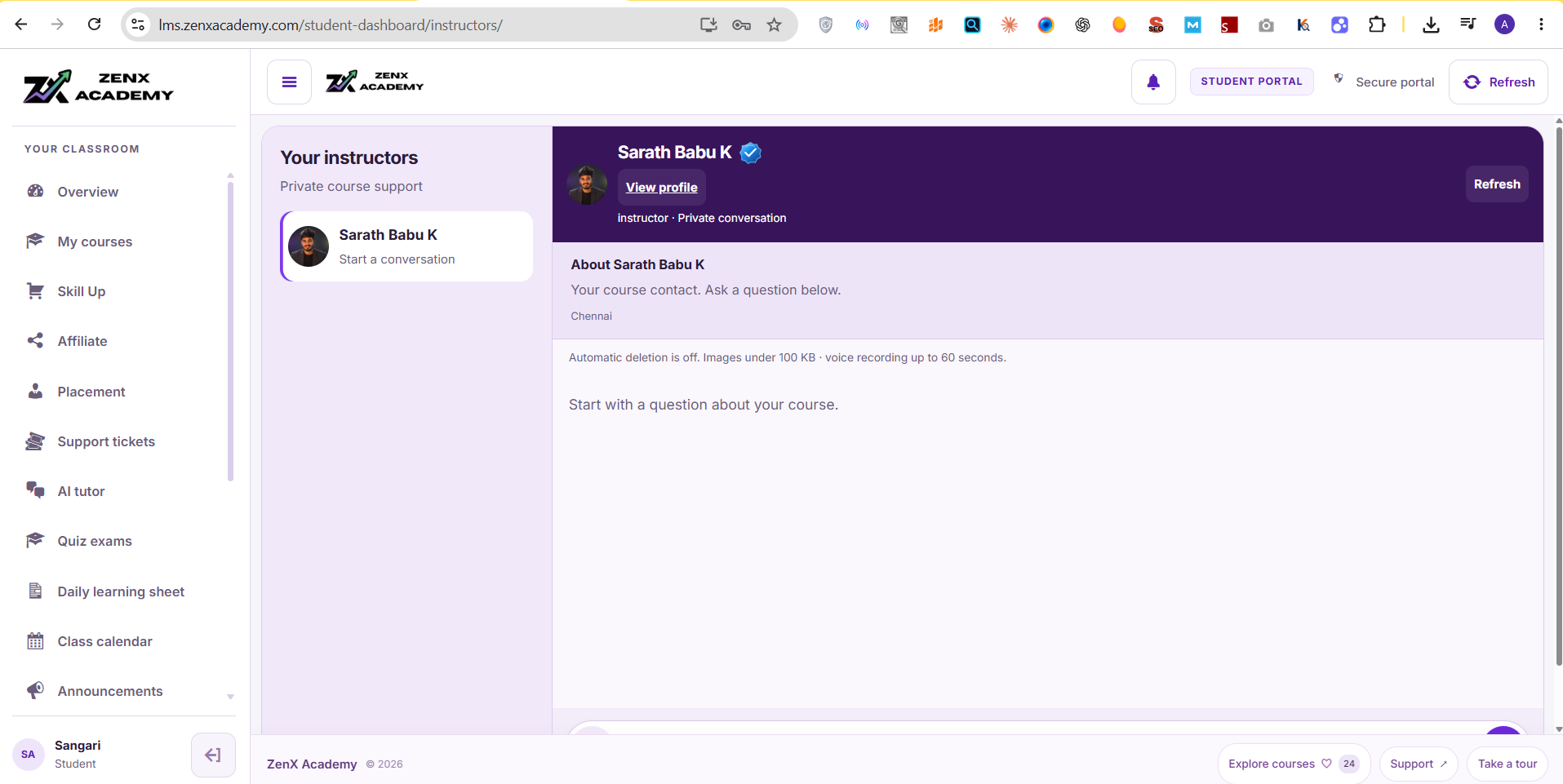
Choose Instructors for course questions, or Support tickets for account and reward issues. Explain which step failed and include a relevant screenshot. Do not share passwords or verification codes.
What Benefits Can ZenX Coins Unlock?
The supplied achievement table lists profile badges and coin-achievement ticks at published thresholds. These provide visible recognition in the learning platform; they are not cash rewards or external credentials.
| Achievement | Coins required in the screenshot | Listed benefit |
|---|---|---|
| Learning Starter | 100 | Profile badge |
| Consistent Learner | 500 | Profile badge |
| Skill Builder | 1,000 | Profile badge |
| Green achievement tick | 500 | Coin-achievement tick on profile and leaderboard |
| Blue achievement tick | 1,000 | Coin-achievement tick on profile and leaderboard |
| Explorer | 1,500 | Profile badge |
| Practice Champion | 2,000 | Profile badge |
| Knowledge Expert | 3,000 | Profile badge |
| Academy Mentor | 5,000 | Profile badge |
Points may change: ZenX Academy may update coin rewards, badge thresholds, eligibility and redemption rules at any time. The figures and screenshots below are examples recorded on 20 October 2026. Always check the latest LMS rules before claiming or redeeming.
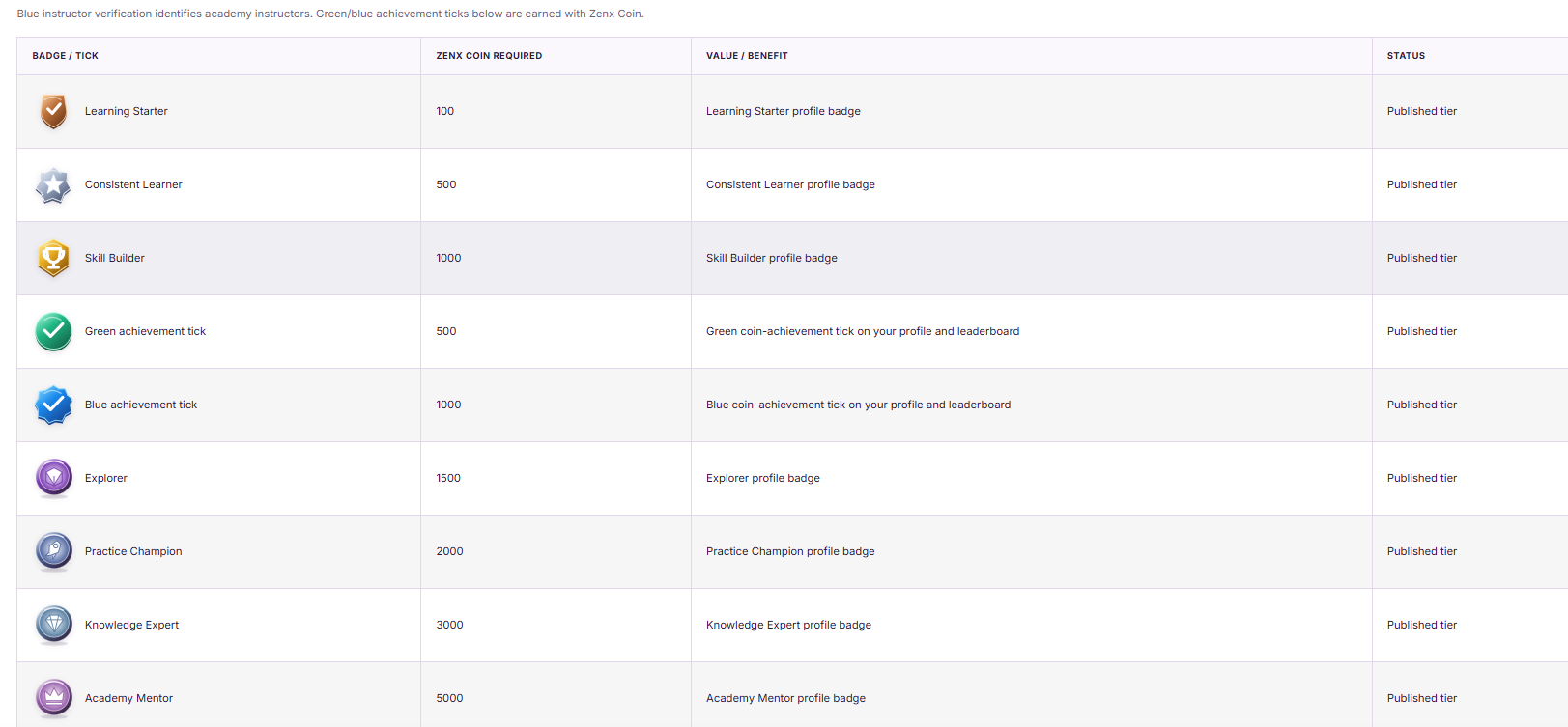
The screenshot distinguishes blue instructor verification from earned achievement ticks. An achievement tick does not mean instructor status. Likewise, “Academy Mentor” is a badge label, not proof of appointment as an academy instructor. The table does not establish whether a badge is automatic or consumes coins; check the current reward rules before redeeming anything.
Can You Redeem 2,000 ZenX Coins for a Coupon?
A minimum 2,000-coin coupon redemption route is a proposed academy plan. The supplied screenshot currently lists 2,000 coins as the Practice Champion badge threshold, which is a separate benefit. A badge threshold does not confirm an active coupon.
When a coupon programme becomes available, its terms should specify the discount, eligible courses, minimum balance, whether coins are deducted, expiry date and any limits. Until an actual redemption option and terms appear in the LMS or an official announcement, do not describe the coupon as available or assign it a rupee amount.
How Can You Convert ZenX Coins into Money?
A working ZenX Coins-to-money conversion route has not been verified. The screenshots show learning rewards and badges, not a cash withdrawal button, bank payout method or exchange rate. There is no supported basis here for saying 1 coin equals ₹1 or that 2,000 coins can be withdrawn as ₹2,000.
Coupon redemption, if launched, would reduce the price of an eligible purchase according to its terms. That is different from receiving money in a bank account. If a future cash redemption programme is introduced, use only the official method and check the conversion rate, eligibility, limits and processing conditions before relying on it.
What Is the Future Plan for ZenX Coins and Cryptocurrency?
ZenX Academy’s stated future idea is to explore a cryptocurrency-linked ZenX Coin programme and a possible airdrop connected with accumulated rewards. This is a planned direction, not confirmation that a token, exchange listing or airdrop is live.
There is currently no verified launch date, token contract, supported blockchain, conversion ratio, exchange listing, token allocation or withdrawal process established by the supplied evidence. Existing LMS points should not be described as already tradable cryptocurrency.
If the programme launches, the academy would need to publish eligibility rules, any snapshot date, point-to-token allocation, claim instructions and restrictions. Selling would be possible only if a transferable token and an actual supported market exist under the applicable terms. Listing, liquidity, price and the ability to sell are not guaranteed; no future cash amount can be promised from today’s point balance.
What Should You Do If a Claim or Balance Looks Wrong?
First check whether the activity is eligible, already claimed, awaiting task approval or unavailable. Sign out and back in only when needed for access; do not repeatedly submit activities to force rewards. A page refresh is not a new sign-in.
If the balance still looks incorrect, use “Support tickets” in your student dashboard. Include the activity, approximate time, expected reward and a screenshot with private details hidden. Never send your password, one-time code or other login secrets. Keep learning records until the team resolves the issue.
Frequently Asked Questions About ZenX Coins
Are ZenX Coins free to earn?
Eligible activities can earn ZenX Coins without purchasing coins. However, access to a lesson or course may depend on your enrolment. Account creation does not mean every learning activity is free.
How many coins do I get for a successful login?
The current dashboard states that each successful student sign-in earns 5 ZenX Coins. Refreshing a page does not count as a successful sign-in reward.
How many coins can I claim from ZenX Academy social accounts?
The displayed Instagram, YouTube and LinkedIn rewards are 25 coins each: 75 coins altogether if all three are available and claimed successfully. Each reward is available once per account.
Can I claim ThinkSarath social rewards now?
Not while the cards say “Link coming soon” and the claim controls are disabled. The displayed rate is 10 coins each, but a published amount does not make an unavailable reward claimable.
Does opening a social link verify that I followed the account?
No. The LMS says claims are self-declared and opening a link does not verify a follow or subscription. Follow the current activity instructions and claim honestly.
Where do I check my ZenX Coin balance?
Sign in to the student dashboard and look for “Zenx Coin earned” or the coin balance area. Check any available activity history and use support tickets if a completed eligible activity is missing.
Does submitting an assignment earn 25 coins immediately?
The published reward is for an approved task, not merely a submitted assignment. Wait for the required approval and check the portal’s task status before expecting the reward.
How do quiz rewards work?
The screenshot lists 5 coins for a submitted quiz attempt plus the configured weight of correct answers. Incorrect answers receive 0 for the correct-answer component. Attempt eligibility follows the quiz rules.
What is the difference between a blue achievement tick and instructor verification?
The blue coin-achievement tick is an earned profile or leaderboard marker. Blue instructor verification identifies academy instructors. Earning the achievement tick does not grant instructor status.
Do achievement badges spend my ZenX Coins?
The screenshot gives coin thresholds but does not confirm whether coins are deducted. Read the current badge or redemption rules; do not assume badges consume or preserve the balance.
Can I withdraw ZenX Coins to UPI or my bank account?
No verified UPI or bank withdrawal process is established by the current screenshots and dashboard. Treat ZenX Coins as LMS reward points unless official cash redemption terms are launched.
What is the rupee value of one ZenX Coin?
No fixed rupee conversion rate has been verified. A coin count, badge threshold or proposed coupon does not establish a cash value.
Is the 2,000-coin coupon already available?
The 2,000-coin coupon route is a proposed plan. The screenshot confirms a Practice Champion badge at that threshold, not an active coupon or a defined discount.
Will ZenX Coins definitely become cryptocurrency or receive an airdrop?
No. Cryptocurrency integration and an airdrop are future ideas, subject to an actual launch and published terms. A reward balance does not guarantee tokens, an exchange listing or money.
How do I start collecting ZenX Coins?
Create a student account or sign in using the official links, review the dashboard’s reward rules and complete eligible activities. Start with available social claims and learning tasks your account can access.
Ready to start? Create your student account or sign in to the ZenX Academy LMS. Explore your available learning activities and check each reward’s conditions before claiming.
Updated 20 October 2026. Screenshots illustrate the LMS at that time; screens, access and reward rules may change. Coupon and cryptocurrency plans remain subject to official launch and terms.