 ChatGPT
 Perplexity
A useful ZenX Community question explains your goal, what you tried and the exact point where you are stuck. Give readers enough context to respond without guessing. Tamil and English discussions are welcome.
Start your discussion in the right place
- Open Explore communities and find a relevant topic.
- Read nearby discussions to understand the space’s focus.
- Review the community guidelines.
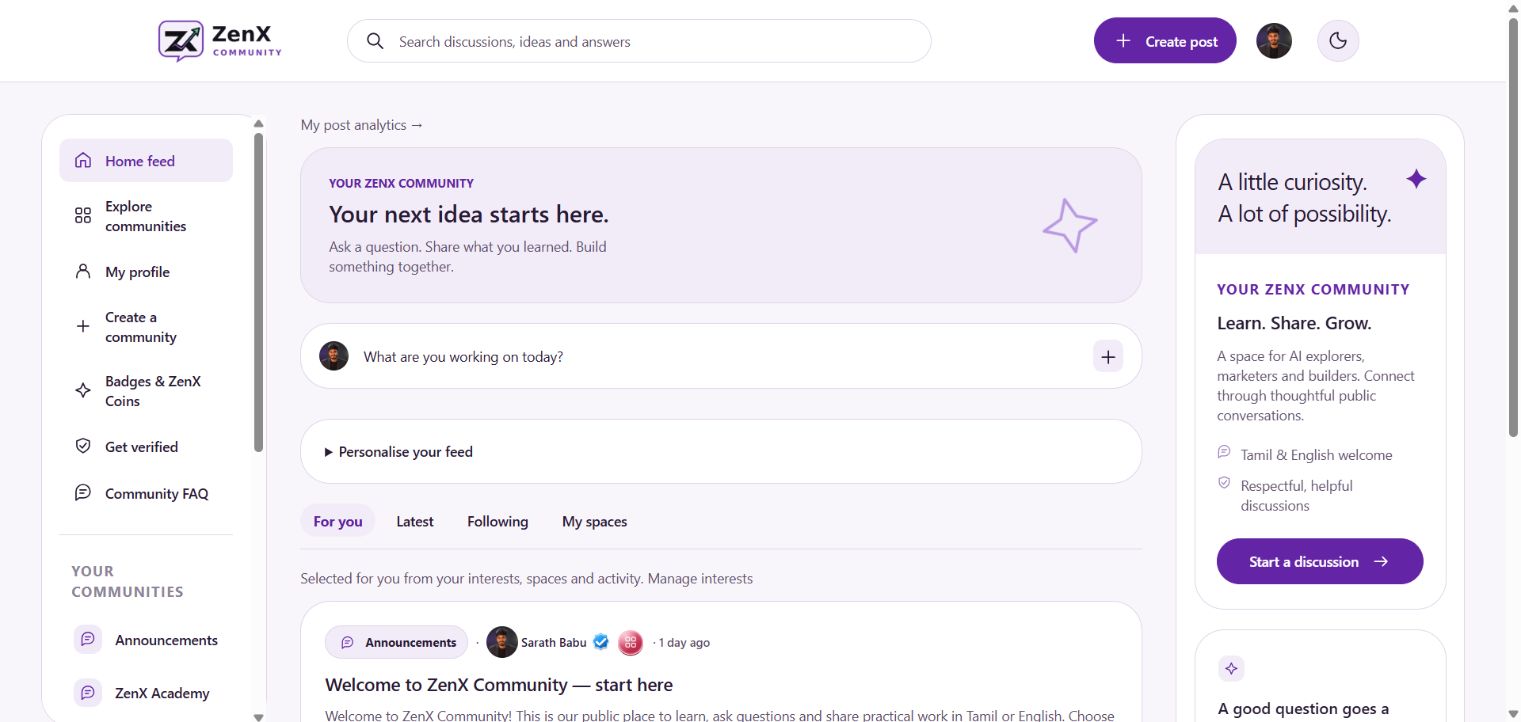
- Choose Create post from the header or the home-feed composer.
- Write a specific title and add the context your question needs.
This guide covers how to prepare a helpful question. The screenshot documents the actual entry point; it does not show every field in the post editor.
A question template you can copy
Goal: I want to…
Context: I am using… for…
What I tried: I tested…
What happened: I expected… but saw…
My question: Which part should I check next?
Turn a vague question into a useful one
| Topic | Vague | Clearer illustrative question |
|---|---|---|
| AI tools | Which AI is best? | I need to summarise Tamil class notes into English bullet points. What should I compare when choosing a tool? |
| SEO | My SEO is bad. | I changed a page title yesterday. Which checks help distinguish an indexing issue from a ranking issue? |
| Google Ads | Ads are not working. | My goal is demo enquiries. I have grouped keywords by service; how should I review search intent before choosing match types? |
| Automation | My workflow failed. | The trigger runs, but the next step reports a missing field. What non-sensitive details should I include for troubleshooting? |
What should a helpful screenshot show?
When relevant, prepare a screenshot that makes the problem visible: the selected setting, the error message or the layout you want feedback on. Remove passwords, access tokens, personal contact information and unrelated private data before sharing. A short caption should tell readers what to notice.
Before you submit
- The title describes one question.
- The post includes the intended outcome.
- You have separated what you observed from what you suspect.
- Examples are understandable without account access.
- You have read the space’s rules.
Continue the conversation
When someone responds, explain what happened after trying their suggestion. If the issue is solved, share the useful finding so later readers can learn from the discussion. Read the official welcome post for the community’s introduction.
New to the platform? Read the ZenX Community launch guide for a wider tour. Interface screenshots reflect 23 October 2026; use the linked community pages for current details.