 ChatGPT
 Perplexity
ZenX Community uses a blue tick for verified members and a green tick for verified spaces. Verification is manually reviewed. Verifying your email alone does not award a public tick.
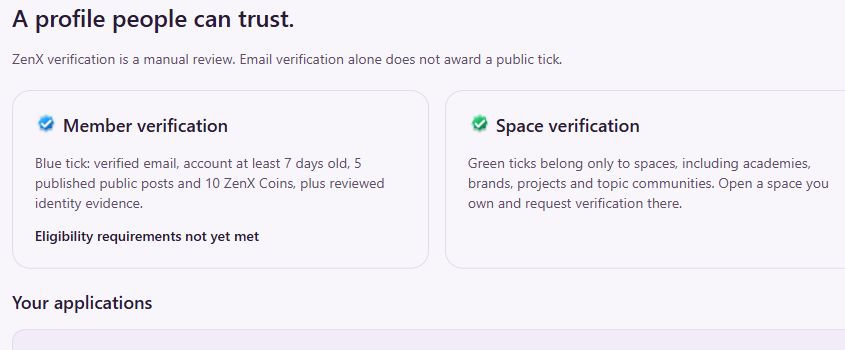
Blue member tick and green space tick compared
| Indicator | Applies to | Where to begin |
|---|---|---|
| Blue tick | Individual member profile | Open Get verified from the community navigation. |
| Green tick | Spaces such as academies, brands, projects and topic communities | Open a space you own and request verification there. |
| Achievement badge | Follower or contribution milestone | Open Badges & ZenX Coins; this is separate from verification. |
What are the blue-tick requirements?
The verification page observed on 23 October 2026 lists:
- A verified email address.
- An account at least 7 days old.
- 5 published public posts.
- 10 ZenX Coins.
- Reviewed identity evidence.
These are eligibility criteria shown by the platform, not a promise of automatic approval. Review the current requirements on the linked page before applying.
How to request member verification
- Sign in and open Get verified.
- Read the eligibility notice and check your application status.
- Review the member verification option and enter the requested supporting details.
- Prepare only the minimum evidence needed for review.
- Read the consent statement before submitting the application.
The form includes a supporting-document field for PDF, JPEG or PNG files up to 5 MB. This guide explains the observed process; no application was submitted to prepare it.
Prepare evidence without exposing unnecessary data
The page instructs applicants to mask government ID numbers, date of birth, address and financial details. It says not to upload Aadhaar, passport or payment documents, and suggests a redacted professional/student card or business registration.
The site states that supporting documents are private to authorised administrators, access expires after 30 days and scheduled cleanup removes expired documents. Read the current Privacy Policy and application guidance before uploading.
Why might email verification not show a blue tick?
Email verification confirms an account step; the public member tick requires a separate manual review. Likewise, an earned ZenX Coin badge does not replace the member-verification process.
Where do space owners apply?
Green ticks belong to spaces. Use Explore communities to find your space, open the one you own and follow its verification option. Do not use the member’s blue-tick process as a substitute for space verification.
For related questions, read the official verification and rewards FAQ.
New to the platform? Read the ZenX Community launch guide for a wider tour. Interface screenshots reflect 23 October 2026; use the linked community pages for current details.